
First, we want to say — we're sorry. If you're reading this because someone you care about has recently passed, please know that the Paige team is here to support you, and we'll make this process as simple and gentle as we can.
This article walks you through how to report a passing to Paige so that delegates can access the account information the person left behind for them.
Just need the quick steps? Here's the process at a glance:
- Check what documentation you'll need based on your situation (see the table below)
- Complete the Report a Passing form
- The Paige team will review your submission and follow up
- Once verified, delegates will be granted read-only access to the account
Need more detail? Keep reading — we've explained each step fully below.
Table of Contents
Who Can Report a Passing
What You'll Need Before You Start
Step 1: Complete the Report a Passing Form
Step 2: The Paige Team Reviews Your Submission
Step 3: Delegate Access is Granted
What Delegates Can Access
Need Help Along the Way?
Common Questions
Who Can Report a Passing
A passing can be reported by anyone who has been designated as a delegates on the Paige account. Delegates are trusted individuals the account holder chose during their lifetime to help manage and access their estate information.
If you're not sure whether you've been designated as a delegate, our team is happy to help. Reach out at help@go-paige.com or through the live chat on go-paige.com.
What You'll Need Before You Start
What you'll need to have ready depends on your situation. The table below can help you figure out where you stand before you open the form.
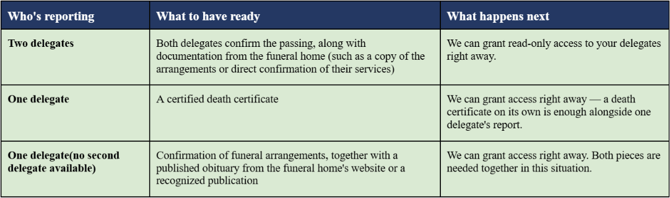
A note on obituaries: An obituary must come from a funeral home's website or a recognized publication to be accepted as verification. Obituaries posted only on aggregator sites or social media are not sufficient on their own.
Step 1: Complete the Report a Passing Form
When you're ready, open the Report a Passing form to submit your information. The form has three short sections:
Your Information
- Your first and last name
- Your email address
- Whether you are a delegate on the account (checkbox)
Your loved one's information
-
Their full name
-
The email address associated with their Paige account
Documentation
Depending on your situation (see the table above), you'll upload one or more of the following:
- Legal pronouncement of death
- Death certificate
- Other supporting documentation
There is also a checkbox to indicate if an additional delegate will be submitting their own report separately.
If you have any trouble with the form, or would prefer to speak with someone directly, reach out at help@go-paige.com or via live chat at go-paige.com.
Step 2: The Paige Team Reviews Your Submission
Once you've submitted the form, our team will review your information and the documentation you provided. We'll follow up with you directly by email to confirm the outcome or let you know if we need anything additional.Step 3: Delegate Access is Granted
Once the passing has been verified, designated delegates will be granted read-only access to the account.
This means a delegate can view everything the account holder put into their Paige account — their documents, stored passwords, scheduled messages, memories, and any other information they chose to organize and keep there. It can be a thought to find — that someone you cared about took the time to put all of this together. We hope that what they've left behind can be a source of clarity, and perhaps even comfort, during a difficult time.
Read-only access is intentional. It's designed to make sure the account holder's wishes are honored exactly as they left them, while giving the people they trusted a clear and complete picture of everything they prepared.
What Delegates Can Access
After verification, delegates can view the information the account holder chose to share with them. Depending on what was set up, this could include things like:
- Wills and estate planning documents
- Stored passwords and account credentials
- Important personal and financial documents
- Scheduled messages and final wishes
- Memories and other personal records
Access is shaped by what the account holder set up during their lifetime. Each person's Paige account reflects the planning they chose to do — so what's available may vary.
Need Help Along the Way?
We know this isn't an easy time, and we don't want logistics to add to what you're carrying. If you have questions at any point — whether it's about the form, your delegate status, or what access looks like after verification — please reach out.
- Email: help@go-paige.com
- Live chat: go-paige.com (look for the chat icon in the bottom-right corner)
Our team is here, and we're glad to help.
Common Questions
"What if I only have one of the two documents required as a sole delegate?"
If you're the only delegate and don't have both a funeral arrangement confirmation and a published obituary, reach out to us at help@go-paige.com before submitting. Our team can advise on the best path forward for your situation.
"Does the obituary have to come from a specific source?"
Yes — to be accepted as verification, an obituary needs to come from a funeral home's website or a recognized publication. An obituary posted only on an aggregator site or shared via social media is not sufficient on its own. If you're unsure whether what you have qualifies, contact us at help@go-paige.com and we'll help you figure it out.
"Can more than one delegate submit the form?"
Yes — if two delegates are both reporting, each can submit the form separately. There's a checkbox on the form to indicate that an additional delegate will be reporting. The table above explains what documentation to have ready based on your situation.
"What does read-only access mean?"
Read-only access means a delegate can view everything in the account holder's Paige account, but cannot edit, delete, or change anything. The account holder's words, wishes, and documents stay exactly as they left them.
"What if I'm not sure whether I'm a delegate?"
Reach out to us at help@go-paige.com. Our team can look into the account and help clarify your status.